You've built the perfect Sales Navigator search. Hundreds of buyers with exactly the right titles. Then you look for the export button, and there isn't one.
A LinkedIn Sales Navigator scraper gets you past that. It reads your search page by page and hands you a spreadsheet of names, titles, companies and profile links. Most also find a work email for each lead.
We compared 8 of them on what matters when you're the one paying: how they get the data, whether they find emails, what they charge you for, and how careful they are with your LinkedIn account.
Disclosure: we make LeadExportr, one of the tools on this list. To keep the comparison fair, every price, limit and rating below comes from each vendor's own website, help center or Chrome Web Store listing, checked on 28 October 2026. Where another tool beats ours, we say so.
The short answer
- Exporting whole searches with verified emails, on a budget: LeadExportr. Exports are unlimited from $19 a month, and you only pay for emails that pass verification.
- The cleanest data: Evaboot. It re-checks every lead against your search filters.
- Emails for a few profiles at a time: Skrapp. The best-rated extension here, and it only charges for emails it finds.
- Phone numbers: Kaspr, or Scrupp if you want phones in the same export.
- Automating more than exports: PhantomBuster.
- Huge volumes at the lowest price per lead: lobstr.io.
- Developers who want an API: Apify.
Sales Navigator scrapers at a glance
| Tool | Type | Finds | You pay for | Price |
|---|---|---|---|---|
| LeadExportr | Extension | Verified emails | Verified emails only | Free, then $19/mo |
| Evaboot | Cloud | Verified emails | Every lead exported | From $9/mo |
| Skrapp | Extension | Emails | Emails found | Free, then $39/mo |
| Kaspr | Database | Emails, phones | Each detail, plus exports | From $65/mo |
| PhantomBuster | Cloud | Emails, as an extra step | Run time, plus email attempts | Trial, then $69/mo |
| lobstr.io | Cloud | Emails, phones | Each lead, plus emails and phones found | Free, then $20/mo |
| Scrupp | Cloud | Emails, phones | Each lead, plus emails and phones found | Free, then $29/mo |
| Apify | Cloud | Profile emails only | Each result | $5 per 1,000 results |
Prices are per month in US dollars, and most are lower if you pay yearly. "Free" means a free plan you can try on a real search.
How we compared them
We looked at six things for each tool:
- How it gets the data. A Chrome extension working in your own browser, a cloud service using a copy of your LinkedIn session, or a lookup in the vendor's own database.
- What it exports. Lead searches, account searches, lead lists, account lists and saved searches.
- Emails and phones. Whether it finds them, and whether they're verified.
- What you pay for. Per lead exported, per email found, or per hour of run time. This changes your bill more than the headline price.
- Limits and account safety. Daily caps, and what the vendor itself recommends.
- The free plan. Whether you can test it on a real search before paying.
We didn't run a paid test of every tool. Everything below comes from the vendors' own pages. Where a vendor's pages disagree with each other, we say so.
The 8 best LinkedIn Sales Navigator scrapers
1. LeadExportr
Best for: exporting whole searches with verified emails, without paying for leads that have no email.
This is our tool, so read this entry with that in mind. LeadExportr is a Chrome extension that opens a side panel in Sales Navigator. Click Export and it pages through your search inside your own browser, pausing 7 to 10 seconds between pages the way a person would. One more click finds each lead's work email: several email providers try in turn, then BounceBan verifies every address before you see it.
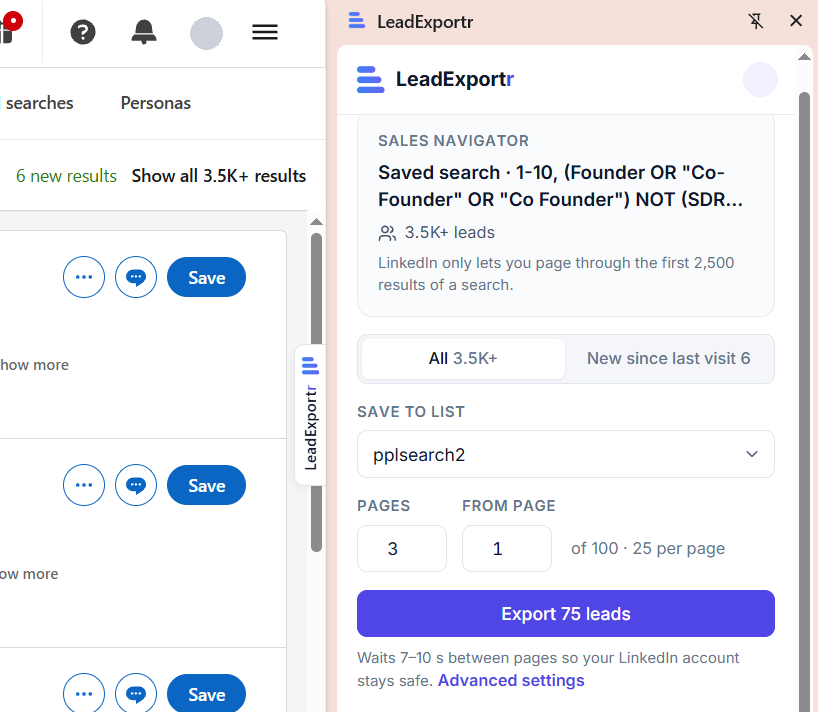
- Exports: lead and account searches, saved searches (every result or only new ones), lead lists and account lists. It also exports regular LinkedIn searches, your connections and single profiles.
- Emails: found by a waterfall of three providers, then verified a second time by BounceBan. You only pay for emails that pass. Risky ones are free.
- Output: CSV or Excel, or straight into a Smartlead campaign or your own API endpoint. Names and company names come out cleaned up.
Pros
- Unlimited exports on every paid plan
- You only pay for verified emails
- Simple enough for your first export
Cons
- No phone numbers
- LinkedIn's 2,500-results-per-search limit applies, so you split bigger searches yourself
- Few reviews so far
Price: the free plan exports 75 leads at a time and includes 15 verified emails. Starter is $19 a month for 500 verified emails, and Pro is $59 for 2,000. Both export without limits. See pricing.
Chrome Web Store: 4.2 stars from 5 ratings, 345 users.
2. Evaboot
Best for: teams who want the cleanest possible list and don't mind paying for every lead.
Evaboot is the best-known Sales Navigator exporter. You click Export in Sales Navigator, and Evaboot connects to your LinkedIn account with your session cookies and runs the export through it. It visits each lead's profile and checks it against your search filters. Evaboot says Sales Navigator returns 20 to 30% of leads that don't actually match your filters, and it flags them for you.
- Exports: lead and account searches, lead and account lists, and saved searches.
- Emails: work emails, verified and marked "safe" or "riskier". No phone numbers; Evaboot suggests pairing it with Datagma.
- Limit: 2,500 leads or 1,000 accounts per 24 hours, per Sales Navigator account.
Pros
- Filter re-checking and name cleaning
- Unlimited seats, and credits roll over while you're subscribed
- CRM integrations and an API
Cons
- One credit per exported lead, even when no email is found. Evaboot's help center says: "A lead costs 1 credit whether or not an email is found for it."
- You can't export leads without emails to save credits
- Needs a Sales Navigator seat; it doesn't work on regular LinkedIn
Price: $9 a month for 100 credits, $29 for 400, $49 for 1,000, up to $299 for 15,000 (Evaboot pricing). Its pages disagree on whether there's a free trial.
Rating: Evaboot shows a G2 rating of 4.6. Its Chrome Web Store listing was reissued in 2026 under the name "SN Copilot" and has no ratings yet.
3. Skrapp
Best for: finding emails for a handful of Sales Navigator profiles or a list, while only paying for emails found.
Skrapp is an email finder first. Its Chrome extension works on your Sales Navigator people searches, lead lists and account lists, and can page through several pages of results. It's the best-rated extension on this list.
- Exports: Sales Navigator people searches, lead lists, account lists and saved searches.
- Emails: work emails checked against the company's mail server. No phone numbers.
- Limit: Skrapp's own safety guide puts Sales Navigator at up to 2,500 profiles a day.
Pros
- Paid plans only charge for emails marked Valid or Catch-all, and finding the same email again is free
- Credits roll over on paid plans
- 4.9 stars from 546 ratings
Cons
- The free plan can't page through results or export lists
- Catch-all emails, which can't be fully confirmed, still use a credit
- On the free plan, every result that comes back uses a credit
Price: free with 50 credits. Paid plans start at $39 a month for 2,000 credits, or $29 a month paid yearly (Skrapp pricing).
Chrome Web Store: 4.9 stars from 546 ratings, 200,000 users.
4. Kaspr
Best for: phone numbers, especially direct mobiles.
Kaspr, part of Cognism, works a little differently. Its extension runs in your LinkedIn session, but the contact details come from Kaspr's own database rather than being found live. In bulk, it enriches Sales Navigator searches and lead lists through "enrichment workflows".
- Exports: Sales Navigator searches and lead lists, up to 2,500 contacts per search. Each launch is capped at 500 leads on Starter and 1,000 on Business.
- Emails and phones: work emails, personal emails and phone numbers, each on its own type of credit.
Pros
- Phone numbers on every plan
- The largest review base on this list
- Unlimited work emails on paid plans (Kaspr's terms cap this at 10,000 a month)
Cons
- Using it on Sales Navigator needs a paid plan
- Credits are charged per piece of data, and export credits are spent every time you export
- In bulk, Kaspr charges even when nothing is found, unless you mark a field as required
Price: Starter is $65 a month, or $49 a month paid yearly. Business is $99 a month, or $79 paid yearly. Prices are per user (Kaspr pricing).
Chrome Web Store: 4.7 stars from 1,200 ratings, 100,000 users.
5. PhantomBuster
Best for: people who want to automate a whole workflow, not just exports.
PhantomBuster runs "Phantoms", small cloud automations. Its Sales Navigator Search Export Phantom uses your LinkedIn session cookie to export a search from PhantomBuster's servers, so your computer can be off. It can run on a schedule and pick up only new results.
- Exports: lead and account searches. Lists need a separate Phantom, Sales Navigator List Export.
- Emails: not in the search export. A separate "Search to Emails" workflow finds them through BetterContact's waterfall, and one credit is one attempt, so you may use more credits than you get emails.
- Limit: PhantomBuster recommends at most 2,500 search results a day, and 1,000 for new or rarely used accounts. A full 2,500-lead search takes about 35 minutes of run time.
Pros
- Runs in the cloud on a schedule
- Chains exports into enrichment, outreach and CRM steps
- Supports several Sales Navigator accounts in one automation
Cons
- You pay for run time, plus a separate pool of email credits
- A search, its lists and its emails need two or three different Phantoms
- The trial and free plan only export 10 rows
Price: Start is $69 a month, or $56 a month paid yearly, with 20 hours of run time and 500 email credits. There's a 14-day free trial with no card (PhantomBuster pricing).
6. lobstr.io
Best for: big volumes at the lowest price per lead.
lobstr.io's Sales Navigator Leads Scraper runs in the cloud using your synced Sales Navigator session. It returns 103 fields per lead, and its Split Search feature breaks a big search into smaller ones to get past the 2,500 limit, up to about 50,000 leads.
- Exports: lead searches only. Account searches need a separate scraper.
- Emails and phones: optional during the scrape. An email adds 9 credits and is only charged when one is found and validated. A phone adds 300 credits, only when found.
- Limit: lobstr.io says each synced account can run up to 1,000 searches a day. Its own pages disagree on how many leads that safely allows.
Pros
- Leads alone cost $0.50 to $2 per 1,000
- Email and phone credits are only charged when something is found
- Splits big searches automatically
Cons
- Its sync extension isn't in the Chrome Web Store. You install it from a ZIP file in Chrome's Developer mode, and it doesn't update itself
- Lead searches only
- The free plan exports 30 rows, and credits don't roll over
Price: free with 100 credits a month. Starter is $20 a month for 10,000 credits, or $16 paid yearly. A lead with an email found costs 10 credits, about $10 per 1,000 such leads on the $100 Pro plan (lobstr.io pricing).
7. Scrupp
Best for: emails and phone numbers in one export, from searches bigger than 2,500.
Scrupp exports Sales Navigator lead searches, account searches and saved lists, and finds emails and phones in the same run. Its pricing page says scraping runs in the cloud using your LinkedIn cookies, while its homepage says it runs inside your Chrome session. For searches over 2,500 results, it splits the search into parts and gives you one list at the end.
- Exports: lead searches, account searches and saved lists, with no daily limit set by Scrupp.
- Emails and phones: emails are checked with an SMTP test. Phones cost extra.
Pros
- Emails and phones in one export
- Gets past the 2,500 limit by splitting searches for you
- Account searches as well as leads
Cons
- One credit per lead even when no email is found, then 1 more per email and 2 per phone. Scrupp's own example: 1,000 leads with 800 emails found costs 1,800 credits
- Its own pages contradict each other on how it works
- A small review base
Price: free with 100 credits a month. $29 a month for 1,000 credits, $59 for 5,000, or less paid yearly (Scrupp pricing).
Chrome Web Store: 4.8 stars from 44 ratings, 1,000 users.
8. Apify
Best for: developers who want Sales Navigator data in their own code.
Apify is a marketplace of scrapers called actors, built by its community. The most used Sales Navigator actor, "Linkedin Sales Navigator Scraper" by Curious Coder, takes lead searches, account searches, saved searches and lead lists. You export your LinkedIn cookies with a browser extension and paste them in. It adds random delays between pages, and stops when LinkedIn starts refusing requests.
- Exports: lead and account searches, saved searches and lead lists, through Apify's API or as files.
- Emails: only the ones people show on their LinkedIn profile. It doesn't find or verify emails.
Pros
- About $5 per 1,000 results
- The widest range of inputs here
- An API and integrations for your own workflows
Cons
- You copy your cookies over by hand
- Maintained by the community, not by Apify
- No real email finding
Price: $5 per 1,000 results, plus a tiny fee per run, paid from your Apify balance. Apify's free plan includes $5 of credit, about 1,000 results, and paid plans start at $19 a month (actor pricing).
Rating: 4.4 from 38 reviews on Apify, with 9,000 users.
Tools you'll see recommended elsewhere
- Wiza still shows up on a lot of lists, but in August 2026 it stopped exporting from Sales Navigator searches, lead lists and account lists, on every plan. Its extension now looks up one profile at a time in Wiza's own database.
- Linked Helper is a desktop app for LinkedIn automation, not a Chrome extension, and your computer has to stay on while it runs. It's cheap, but its full profile extraction defaults to 150 profiles a day.
- No-cookie Apify actors don't use your LinkedIn account at all. One popular actor charges $0.50 per search even when the search returns nothing, and doesn't find emails.
Chrome extension or cloud scraper?
The tools above get your leads in one of three ways:
- Browser extension (LeadExportr, Skrapp): runs inside your own LinkedIn session, on your computer. Keep the tab open until it finishes.
- Cloud scraper (Evaboot, PhantomBuster, lobstr.io, Scrupp, Apify): takes a copy of your LinkedIn session cookie and runs from the vendor's servers, so you can close your laptop.
- Database lookup (Kaspr): matches the leads you see to contact details it already holds.
An extension's requests come from your own computer, at a pace you can see. A cloud scraper's come from the vendor's servers, which is more convenient but takes your account somewhere you can't watch. Either way, what LinkedIn reacts to most is volume and pace.
Per lead or per email: what you're really paying for
The headline price hides the thing that changes your bill most: what one credit buys.
- Per lead exported: Evaboot and Scrupp charge for every lead in the export, with or without an email.
- Per email found: LeadExportr, Skrapp and lobstr.io's email add-on only charge when an email turns up. LeadExportr only charges when it passes verification, too.
- Per run time or result: PhantomBuster charges for the hours an automation runs, and Apify for each result.
Take a 2,500-lead search. A per-lead tool charges for all 2,500 leads, including every lead it couldn't find an email for. A per-email tool only charges for the emails you actually get. If you export big searches often, that difference adds up fast.
Is scraping Sales Navigator safe?
No tool can promise your LinkedIn account will never be restricted. What keeps the risk down is a human pace and reasonable volumes. Most vendors' own guidance lands around 2,500 leads a day per LinkedIn account: Evaboot enforces it, Skrapp recommends it, PhantomBuster recommends it for established accounts, and LeadExportr warns you before you pass it.
How to scrape a Sales Navigator search
With an extension like LeadExportr, it takes a few minutes:
- Add the LeadExportr Chrome extension and sign in.
- Open your Sales Navigator search, lead list or account list, and click the LeadExportr tab on the right edge of the page.
- Pick a list to save the leads into, choose how many pages to export, and click Export.
- When it's done, click View in dashboard, then Find emails, and download the list as CSV or Excel.
Our guide to exporting leads from Sales Navigator walks through every step, including lead lists, account lists and searches over 2,500 results.
Frequently asked questions
What is a Sales Navigator scraper?
A tool that reads the results of a LinkedIn Sales Navigator search or list and saves them to a file. You get each lead's name, title, company and profile link, and with most tools a work email. Sales Navigator has no export button of its own.
What's the best free Sales Navigator scraper?
None of them export full searches for free, but several let you test on a real one. LeadExportr's free plan exports 75 leads at a time with 15 verified emails. Skrapp gives 50 credits, lobstr.io and Scrupp give 100 credits a month, and Apify includes $5 of credit.
Can a scraper export more than 2,500 leads from one search?
Sales Navigator only shows 2,500 results for any lead search. lobstr.io and Scrupp split bigger searches into parts for you. With other tools, split the search yourself by company size, seniority or region, so each part stays under 2,500.
Will a Sales Navigator scraper get my account banned?
It can, if it pulls too much too fast. Keep to a human pace and around 2,500 leads a day per account, which is what most vendors recommend. New or rarely used LinkedIn accounts should go slower.
Do I need Sales Navigator to use a Sales Navigator scraper?
For almost all of them, yes. They export what your own Sales Navigator account can see. Kaspr's free plan works on regular LinkedIn, but using it on Sales Navigator needs a paid Kaspr plan.
Which Sales Navigator scrapers find emails?
LeadExportr, Evaboot, Skrapp, Kaspr, lobstr.io and Scrupp find work emails as part of the export. PhantomBuster needs a separate email workflow, and Apify's actors only return emails people show on their profile.
What's the best Evaboot alternative?
It depends on why you're switching. To stop paying for leads with no email, try LeadExportr or Skrapp. For phone numbers, Kaspr or Scrupp. For bigger volumes at a lower price per lead, lobstr.io.
Does Wiza still export from Sales Navigator?
No. Since August 2026, Wiza no longer exports Sales Navigator searches, lead lists or account lists on any plan. Its extension now shows contact details for one profile at a time from Wiza's database.
Can Sales Navigator export to CSV on its own?
No. LinkedIn's help center says Sales Navigator can't export leads or accounts to CSV or Excel on any plan. Only Advanced Plus syncs with a CRM. See Sales Navigator pricing for what each plan includes.